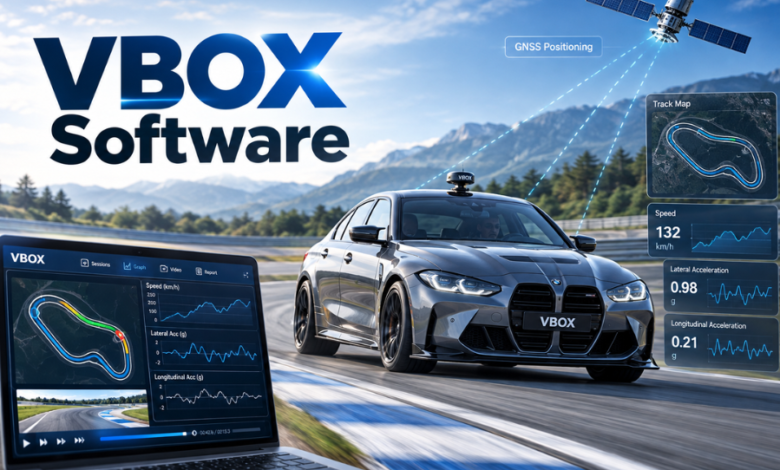
A vehicle’s stopping distance, lane position and response to a potential collision can be measured far more precisely than a dashboard display suggests. VBOX software helps automotive engineers turn those measurements into test results they can inspect, compare and document. Developed by British technology company Racelogic, the VBOX ecosystem combines satellite-based measurement equipment with specialised applications for vehicle development and validation.
Its principal analysis platform, VBOX Test Suite, supports tasks ranging from acceleration testing to advanced driver assistance system assessments. This guide explains what the software does, how its components work together, what users need to get started and how recent updates reflect changing automotive testing requirements. It also clears up an important naming confusion with Oracle VirtualBox.
What VBOX Software Actually Refers To
The name VBOX covers several connected products rather than one universal application. In automotive engineering, it identifies Racelogic’s measurement equipment and the programs used to configure that equipment, examine recordings and produce results. VBOX Test Suite is the main analysis environment, but VBOX Setup and VBOX File Processor serve different purposes.
It is not the same product as Oracle VirtualBox, sometimes shortened informally to VBox. Oracle’s application creates virtual machines that run operating systems within a computer. Racelogic’s products analyse movement and vehicle behaviour in the physical world. Anyone downloading software should establish which product they need before choosing an installer.
The British Engineering Business Behind VBOX
Racelogic was founded in Buckingham in 1992 by Julian Thomas, initially developing electronic systems for motorsport. Its corporate history dates the introduction of the first VBOX to 2000, when improvements in civilian GPS accuracy created new opportunities for vehicle measurement.
That transition mattered because engineers had traditionally relied on equipment such as fifth-wheel measuring systems to capture certain vehicle dynamics. Satellite-based measurement offered another way to record speed, distance and position during testing. Racelogic subsequently developed a broader portfolio spanning GNSS loggers, inertial systems, sensors and analysis tools.
The company’s software has grown alongside the hardware. Rather than simply displaying speed, modern applications interpret recorded signals against test conditions, helping engineering teams examine whether a particular manoeuvre achieved its intended result.
From Vehicle Sensors to Meaningful Results
The Recording Stage
A typical workflow begins with a VBOX data logger installed in or on the test vehicle. Depending on the equipment and configuration, it can capture satellite-derived speed and position alongside information from inertial sensors, vehicle networks or additional measuring devices.
GNSS stands for Global Navigation Satellite System, the broader category encompassing GPS and other satellite constellations. For some applications, supplementary corrections and inertial measurements help improve positioning continuity or precision. Actual accuracy depends on the chosen hardware, configuration, surroundings and test method; no single specification describes every VBOX system.
A recorded session allows engineers to inspect events repeatedly rather than rely on notes taken inside the vehicle.
The Analysis Stage
VBOX Test Suite can open recorded datasets and display relevant channels against time, distance or other measurements. Users select a test plugin, set the necessary parameters and assess the resulting runs. Separate tabs make comparisons between vehicles, configurations or test conditions easier to organise.
The software supports both offline analysis of saved files and online operation with compatible connected equipment. Online mode provides immediate feedback during testing; offline mode gives teams time to review, adjust displays and prepare documentation after a session.
Inside VBOX Test Suite’s Workspace
The workspace combines four principal areas: dashboard, chart, map and video. Dashboard gauges expose selected values, charts show changes, and map traces show a vehicle’s route. When compatible footage is available, synchronised video helps connect a change in the data with what happened on the test track.
Engineers can overlay channels or compare datasets rather than switching repeatedly between disconnected programs. A graph can pinpoint an event while video and position data supply context.
Test Suite also accommodates custom tests for situations not covered by a predefined module. Conditions can be configured so the application identifies relevant runs and calculates results consistently. Repeatability improves, but the conditions still demand engineering judgement.
Where the Specialist Test Modules Matter
Braking and Performance Measurements
Performance modules cover acceleration, deceleration and related manoeuvres. Brake-testing options include speed-to-speed and trigger-based assessments, allowing engineers to examine stopping distances and other measures under defined conditions.
For a braking programme, consistency is essential. Starting speeds, road conditions and trigger settings influence comparisons; software cannot replace a controlled procedure or calibrated equipment.
Advanced Driver Assistance Systems
ADAS modules address tasks associated with systems such as autonomous emergency braking and lane-keeping assistance. These tests often involve carefully defined starting conditions, targets and relative motion. The application helps translate measured events into outputs aligned with selected test protocols.
That makes it useful for development work involving Euro NCAP and other assessment frameworks. However, the presence of a named protocol in the software does not automatically establish that a vehicle has passed an official assessment. Appropriate equipment, procedure and independent requirements remain decisive.
Tyres, Coastdown and Vehicle Noise
Dedicated tyre modules address traction and aquaplaning evaluations. Coastdown tests examine how a vehicle slows when propulsion is removed, providing measurements relevant to road-load determination and related engineering studies. Supported methods include WLTP GTR15 and SAE J2263.
Pass-by-noise modules help organise testing against selected vehicle and tyre noise requirements, including UN regulations. These workflows illustrate the value of specialised software: a test technician needs defined gates, conditions and outputs, not simply a long spreadsheet of sensor readings.
The Supporting Applications Have Different Jobs
VBOX Setup is primarily a configuration tool. With a supported, powered device connected to a computer, it allows users to adjust settings associated with the hardware. Options vary by instrument and can include logging rates, recording conditions and communication parameters.
VBOX File Processor operates after recording. It can rename channels, apply filters, create calculated channels and process multiple files in batches. Supported exports include formats suitable for further analysis, such as CSV and files that can be reopened in Test Suite. Certain functions require registration.
These programs complement the main platform: configure the recorder, collect measurements, then process and analyse them. Motorsport users may also encounter Racelogic’s Circuit Tools and video-setup applications, which serve more specialised recording and lap-analysis workflows.
Files, Reports and the Question of Traceability
VBOX Test Suite supports recorded formats including VBO, DBN and VBB. It can also export data for work beyond its own interface. CSV is useful for spreadsheet analysis, while KML allows geographic traces to be examined in compatible mapping applications.
For formal communication, the software can produce test reports in formats including PDF, Word and Excel. A saved VBTS configuration can preserve test settings and workspace preferences separately from raw measurements, helping teams reproduce an analysis setup.
Documentation still requires discipline. Engineers should retain the original recordings, identify software and firmware versions, document calibration status and record important environmental conditions. Filtering, channel calculations or revised thresholds can affect the interpretation of results. A polished report is not evidence of measurement validity unless its underlying process is sound.
Downloading, Installing and Using It Safely
Racelogic makes VBOX Test Suite available free of charge. Full feature access requires software registration, which involves providing contact and organisational details and completing an email-based confirmation step. Some tools also have separate registration requirements.
The manufacturer’s documentation identifies Windows 7 SP1 or newer, with appropriate .NET Framework compatibility, as an installation baseline. Its downloads catalogue also includes Windows 10 and Windows 11. Compatibility with a legacy system should not be confused with security support: Windows 7 is obsolete, and organisations should follow current IT security policy.
Users should obtain installers through Racelogic’s official distribution channels, match their software with the relevant VBOX hardware and check firmware requirements. The manufacturer cautions that newer software is not always backwards-compatible with older firmware. Testing a known recording after an upgrade is a sensible safeguard before relying on the new configuration operationally.
What Changed in the September 2026 Release?
As of October 2026, Racelogic’s published download information identifies VBOX Test Suite version 2.4.57, released on 9 September 2026. The update introduced a test module for the Insurance Institute for Highway Safety’s Front Crash Prevention 2.0 protocol, covering stationary car, motorcycle and trailer targets.
It also added a beta module for WLTP onboard anemometry within coastdown testing. Other changes included quicker navigation from result tables to chart events, local-time display options, and refinements to brake, noise and ADAS workflows.
These additions show where development is heading: more protocol-specific analysis, clearer movement between results and evidence, and adjustments to accommodate evolving testing methods. Beta functions should be assessed cautiously before being adopted for critical work.
Benefits, Limits and Who Should Use It
The clearest advantage is integration. Data capture, defined vehicle tests, graphical review and report generation can form a connected workflow, reducing the need to rebuild calculations for every session. The targeted modules also help technicians work consistently across repeated trials.
The limitations are equally important. Specialist VBOX equipment can represent a substantial hardware commitment, learning the test setup takes time, and neither the software nor the equipment eliminates GNSS reception issues or poor test design. A free application does not make the wider measurement system free.
Automotive manufacturers, engineering consultancies, proving grounds, component developers and research teams are the most obvious users. A casual driver seeking basic lap timing may be better served by a simpler consumer tool, while an engineer evaluating safety-system performance may need the richer instrumentation and documentation.
Conclusion
VBOX software occupies a specialised position between vehicle measurement hardware and defensible engineering decisions. Racelogic’s Test Suite provides the central analysis environment, supported by configuration and file-processing utilities that address other stages of testing. Its development reflects increasingly complex safety and regulatory workflows. For organisations already using compatible VBOX instruments, the strongest value lies in converting carefully collected measurements into results that can be compared, examined and communicated.
FAQs
Is VBOX software the same as Oracle VirtualBox?
No. Racelogic’s VBOX applications are designed for vehicle data logging, performance measurement and automotive test analysis. Oracle VirtualBox is a separate virtualisation product that runs guest operating systems on a host computer. The similar names describe unrelated technologies, so always check the developer and intended purpose before installing either product.
Is VBOX Test Suite free to download?
Yes. Racelogic provides VBOX Test Suite without a software download charge. Registration is required to unlock its full feature set, and the broader workflow typically depends on compatible VBOX recording hardware. Additional equipment, specialist accessories or services may therefore involve costs even though the analysis software itself is free.
Can I use VBOX software without a connected data logger?
Yes, for supported offline analysis. VBOX Test Suite can open previously recorded compatible files without a logger connected to the computer. A supported hardware connection is needed for live measurement and online testing. Whether a particular dataset contains everything required for a given test depends on the channels originally recorded.
Does VBOX Test Suite work on Windows 11?
Racelogic’s software catalogue includes Windows 11 among the supported operating systems for VBOX Test Suite. Installation still depends on the computer meeting applicable software requirements, and connected equipment may need suitable drivers and firmware. Organisations should check the current release documentation before deploying it to production testing computers.
What can VBOX Test Suite export?
The software supports exports intended for different audiences and tasks. Users can save data, generate reports in formats such as PDF, Word and Excel, and export geographical traces as KML. Available options depend on the workflow and data involved. Retaining original measurements alongside exported summaries helps preserve an auditable record.