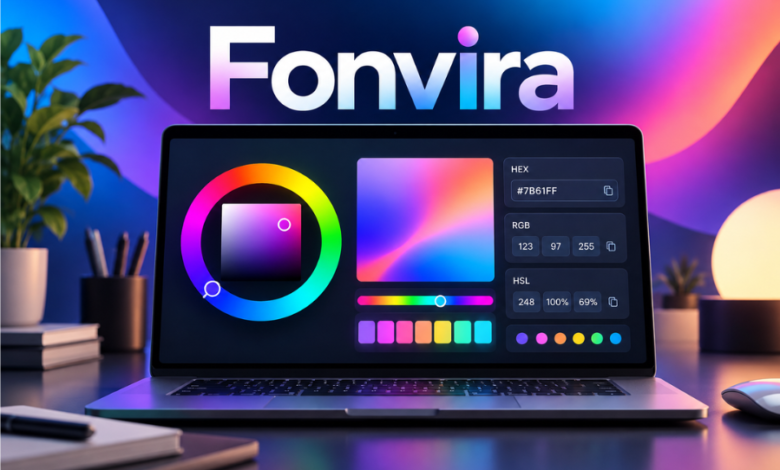
Fonvira is a free browser-based colour picker that converts a chosen shade into HEX, RGB and HSL values, with a live preview and copy controls. Its purpose is deliberately narrow: help someone move a colour from an idea, brand guide or design mock-up into usable web code without stopping to calculate its notation. No account or installation is required, according to the service’s official description.
That simplicity makes Fonvira relevant to web developers, designers and website owners who regularly work between visual choices and technical specifications. Yet choosing a colour is not the same as building an accessible, consistent interface. Understanding what the tool does, how its output should be used and where separate checks remain necessary offers a clearer picture of its practical value.
The Everyday Problem Fonvira Tries to Solve
A colour can travel through several hands before appearing on a website. A designer chooses a blue, a developer receives its hexadecimal code, and a colleague later needs an RGB value. The notations can refer to the same shade, but converting between them interrupts the work.
Fonvira concentrates on that translation. Rather than presenting a sprawling design environment, it offers colour selection alongside numerical results. The aim is to shorten small interruptions, not replace software used to build layouts or brand identities.
Accuracy across handovers matters more than conversion speed alone. When teams record and reuse an approved value, they avoid accumulating slightly different colours across pages, graphics and campaigns.
What You Can Actually Do With Fonvira
Choose a shade and see it immediately
The interface lets users select a colour visually or enter a HEX value. Its live preview makes it possible to examine a shade before transferring it into a project. This is convenient for backgrounds, borders and interface accents.
A preview is not a demonstration of how the colour will look everywhere. Typography, surrounding colours, photographs and screen settings influence perception. The shade should also be tested in its intended context.
Read and copy familiar web colour formats
Fonvira displays corresponding RGB and HSL values with copy controls. Its homepage describes conversion as immediate, without reloading. Users can transfer the notation into a stylesheet or compatible application without manually retyping numbers.
There is no project setup for basic conversions. The service’s About page says it works in desktop and mobile browsers.
One Colour, Three Ways to Describe It
Consider the blue #2563EB. In RGB, it is rgb(37, 99, 235); rounded to whole percentages, its HSL representation is approximately hsl(222, 83%, 53%). These notations express one underlying shade through different numerical systems.
HEX: Compact and Easy to Share
A six-digit hexadecimal code encodes red, green and blue channels using numbers and letters. HEX is familiar in brand guides, design handovers and website settings because it is compact and easy to paste.
However, the notation does not immediately reveal which channel to change to achieve a particular adjustment. Other colour models can be more intuitive during experimentation.
RGB: Direct Control Over Colour Channels
RGB stands for red, green and blue. In common eight-bit notation, each channel ranges from 0 to 255. Developers encounter RGB in stylesheets, drawing operations and application logic.
CSS also supports transparency through an alpha value, such as rgb(37 99 235 / 50%). This is a CSS capability, not a claim that Fonvira includes a separate opacity editor.
HSL: Useful When Adjusting a Shade
HSL represents hue, saturation and lightness. Hue specifies an angle around a colour wheel, while saturation and lightness offer more intuitive controls for many visual adjustments.
It can help designers explore related shades or interface states. Still, changing HSL lightness does not guarantee consistent perceived brightness across hues, and rounded conversions can create small numerical differences.
A Practical Route From Colour Choice to Published Page
Suppose a publisher wants the same blue on article labels, newsletter buttons and promotional graphics. The team should first agree on a source value rather than independently matching the shade by eye.
That value can be entered into Fonvira, previewed and copied in whatever notation each application requires. A developer might define the CSS custom property --brand-blue: #2563EB;, allowing the website to reference the approved colour consistently.
Centralising the value simplifies later updates. But designers must still inspect how it works against different backgrounds, within mobile layouts and alongside text. Fonvira helps specify the colour; the finished interface determines whether it succeeds.
Who Is Likely to Find It Useful?
Freelancers and Small Website Teams
People maintaining a website may switch between a content-management system, graphics editor and stylesheet. A full design application is excessive when the immediate task is merely to convert one approved colour. Fonvira offers a lightweight alternative for that moment.
Developers Working From Design Handovers
A developer might receive HEX codes while working with RGB-based drawing operations or adjusting an HSL shade. Alternative representations reduce retyping errors. Teams should still store approved colours as central design tokens rather than depend on repeated one-off conversions.
Students Learning Digital Colour
Beginners can see how one shade corresponds to several numerical representations. That makes the tool a practical companion to basic HTML and CSS exercises, although it cannot replace learning about accessibility and colour spaces.
The Accessibility Question That Matters More Than Conversion
Fonvira’s website encourages users to consider whether text remains readable against its background. That matters because generating the correct HEX or RGB value does not prove a design is accessible.
The World Wide Web Consortium’s WCAG 2.2 guidelines generally require a contrast ratio of at least 4.5:1 for normal text at Level AA, or 3:1 for qualifying large text. Exceptions include logos and certain incidental text. Some non-text interface components have separate contrast requirements.
A pale grey label can look elegant on a desktop screen yet become difficult to distinguish outdoors on a phone. Each intended text-and-background pairing should be examined using a dedicated contrast checker, ideally alongside testing in the finished interface.
Colour should not be the sole signal of meaning. For example, a form error identified only by a red border can be unclear to people with colour-vision differences; text and icons offer additional cues.
Fonvira supplies colour values that can be tested. Its described core features should not be confused with a full accessibility assessment.
Free Access, Browser Privacy and the Important Qualifications
Fonvira states that its utility is free, with no registration, paywall or installation. Its terms permit personal and commercial use of the service and its output, subject to conditions concerning lawful use and misuse of the website. That makes basic colour conversions available without a subscription decision.
The operator also describes the colour-processing function as client-side: entered values are handled in the browser rather than being sent to its servers for conversion. Its privacy policy, updated on 22 June 2026, says the site does not set advertising or tracking cookies.
That claim should not be mistaken for a promise that opening the website creates no network activity. The same policy mentions possible hosting or content-delivery request logs, necessary cookies from Cloudflare and Google Fonts requests that expose a visitor’s IP address to Google’s servers. Messages sent through the contact form are handled by an external form provider.
These disclosures provide a more precise picture than a blanket description of the service as completely offline or anonymous. They are the website operator’s stated practices, not a substitute for an independent technical privacy audit.
Public-facing pages describe Fonvira as a maintained browser utility but do not establish a named founder, verified company structure, funding history or user statistics. There is consequently no sound basis for presenting it as a major software company or claiming a particular market share.
Where the Tool’s Scope Ends
Fonvira is a picker and converter, not a comprehensive colour-management platform. Its advertised functions do not establish image colour extraction, automated palette generation, shared team libraries, contrast-ratio measurement or advanced wide-gamut support.
Modern CSS supports additional colour systems, including OKLCH and Lab. Working with those formats or managing appearance across devices may require specialist tools. Fonvira’s own disclaimer also advises users to verify important results, and its terms do not guarantee error-free output or uninterrupted access.
The Difference Between Matching Codes and Matching Appearance
A matching colour code is a useful starting point, but it does not guarantee identical appearance across every medium. Screens emit light, while printed materials depend on inks, paper and production conditions. A website’s RGB colour therefore cannot simply be assumed to reproduce exactly in a printed brochure.
Even between screens, brightness settings, display capabilities and neighbouring colours can influence the result. Fonvira’s common web notations are most relevant to screen-based work; professional print preparation requires an appropriate colour-managed process.
This matters for businesses carrying one visual identity across websites, advertisements and physical materials. Keep a documented digital colour specification, but ask printers or production specialists to establish suitable print values and approve proofs when colour accuracy is important.
How to Get the Most From a Small Utility
Start with an approved colour instead of guessing from a screenshot. Enter its HEX code or select a shade, inspect the preview and copy the relevant format. Save the approved value centrally for future reuse.
Then check contrast, inspect mobile layouts and test hover and focus states. Conversion should be a brief step between deliberate design choices and genuine quality assurance.
Conclusion
Fonvira makes a specific part of digital design more convenient: selecting a colour and translating it between common web notations without installation or registration. Its live preview and copy controls suit quick tasks, handovers and introductory CSS work. Its importance lies in reducing small technical interruptions, not replacing design judgement. For reliable results, users should pair those conversions with shared colour standards, real-world interface testing and independent accessibility checks.
FAQs
What is Fonvira mainly used for?
Fonvira is a browser-based utility for choosing a colour, viewing its corresponding HEX, RGB and HSL values, and copying those values into design or development work. It is particularly useful when a colour needs to move between a visual reference, a stylesheet and an application that expects another notation.
Is Fonvira free for commercial projects?
The service’s published terms say that Fonvira is free for personal and commercial use and that users may use the output they generate. Those permissions remain subject to the terms, including restrictions on unlawful use and misleading republication of the site. There is no advertised paid account requirement for its basic converter.
Does Fonvira work on smartphones?
Its official About page describes the tool as usable in desktop and mobile browsers, with no separate installation. A mobile browser should therefore be sufficient for routine colour selection and conversion. As with any web utility, the experience may depend on the device, browser and available connectivity.
Can Fonvira tell whether my colours meet WCAG requirements?
Fonvira publishes advice about readable contrast, but its described primary functionality is colour selection and conversion. It should not be assumed to perform a complete accessibility assessment. Use a dedicated contrast checker for actual text-and-background combinations, and review other accessibility considerations such as focus indicators and meaning conveyed through colour.
Does Fonvira keep the colours I enter?
According to its privacy policy, colour values are processed locally in the browser rather than stored on its servers. The policy separately acknowledges ordinary website infrastructure and third-party requests, so local processing does not mean zero network data is exchanged. Anyone handling sensitive project material should review the current privacy terms.